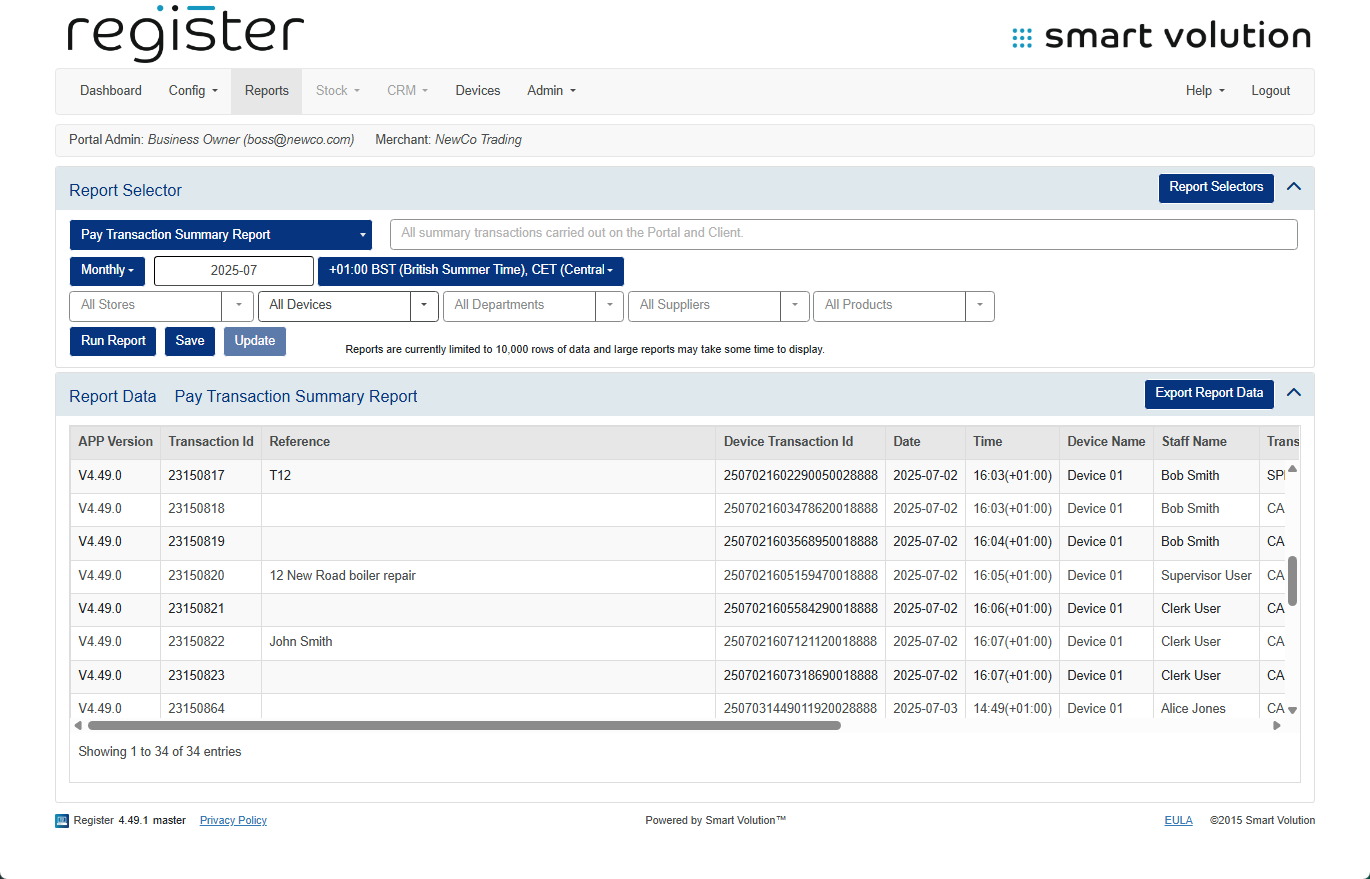
Below is a comprehensive explanation of the values and fields used in the various reports across the device and Web Portal:
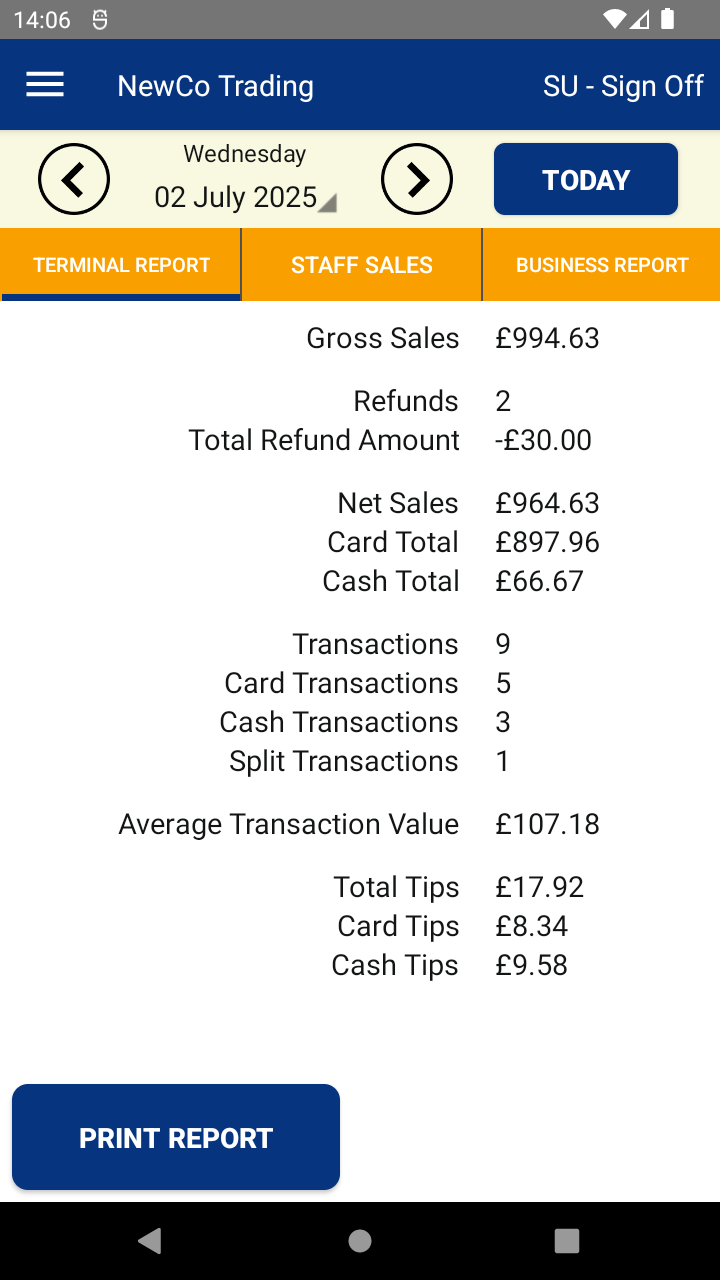
Daily sales totals for the device you are using:
| Report Field | Description |
|---|---|
| Gross Sales | Total sales revenue before refunds |
| Refunds | Number of refund transactions |
| Total Refund Amount | Total value of refunds |
| Net Sales | Gross Sales minus Total Refund Amount |
| Card Total | Total value of card sales |
| Cash Total | Total value of cash sales |
| Transactions | Total number of transactions |
| Card Transactions | Number of card sales |
| Cash Transactions | Number of cash sales |
| Split Tender Transactions | Number of split payment transactions |
| Average Transaction Value | Net Sales divided by Transactions |
| Tips | Total value of all tips |
| Cash Tips | Value of tips received in cash |
| Card Tips | Value of tips received via card |
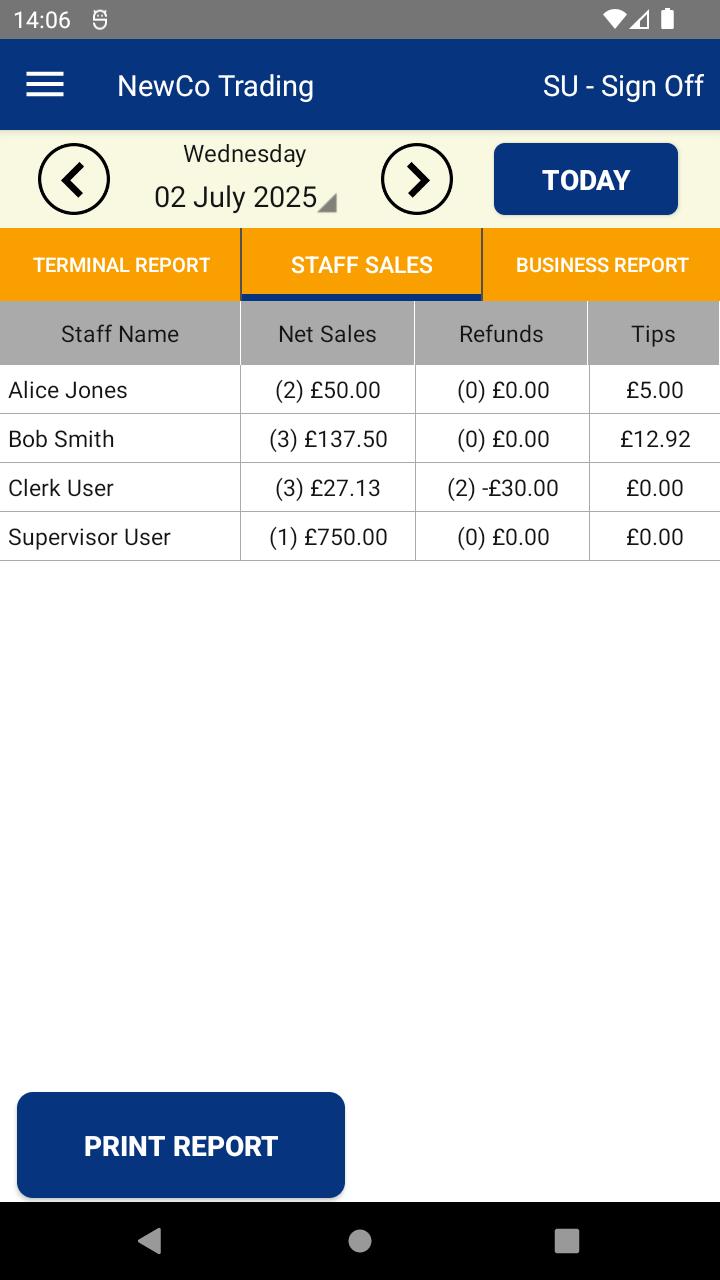
Daily sales totals for the device you are using split by staff member:
| Report Field | Description |
|---|---|
| Staff Name | Name of the staff member |
| Net Sales | Net sales total (with count) per staff member |
| Refunds | Number of refunds (with total amount) by staff member |
| Tips | Total tips received by staff member |
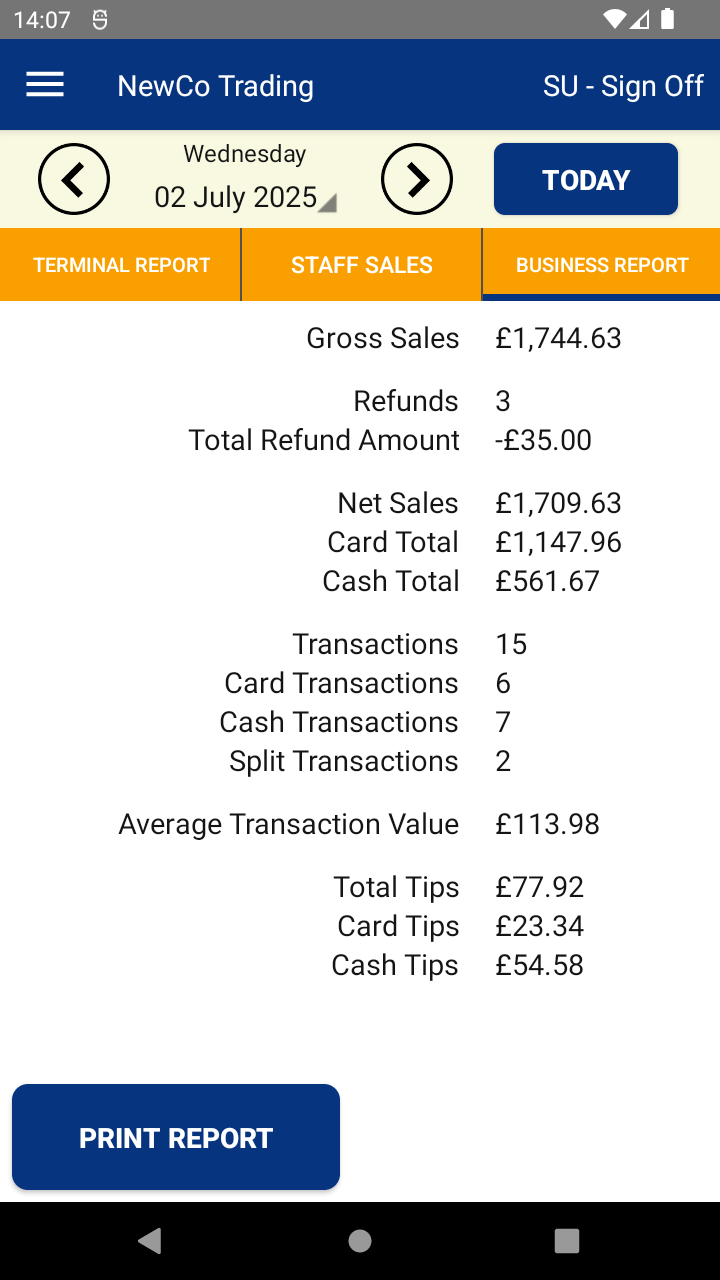
Daily sales totals for the whole business (for customers with multiple devices):
| Report Field | Description |
|---|---|
| Gross Sales | Total sales revenue before refunds |
| Refunds | Number of refund transactions |
| Total Refund Amount | Total value of refunds |
| Net Sales | Gross Sales minus Total Refund Amount |
| Card Total | Total value of card sales |
| Cash Total | Total value of cash sales |
| Transactions | Total number of transactions |
| Card Transactions | Number of card sales |
| Cash Transactions | Number of cash sales |
| Split Tender Transactions | Number of split payment transactions |
| Average Transaction Value | Net Sales divided by Transactions |
| Tips | Total value of all tips |
| Cash Tips | Value of tips received in cash |
| Card Tips | Value of tips received via card |
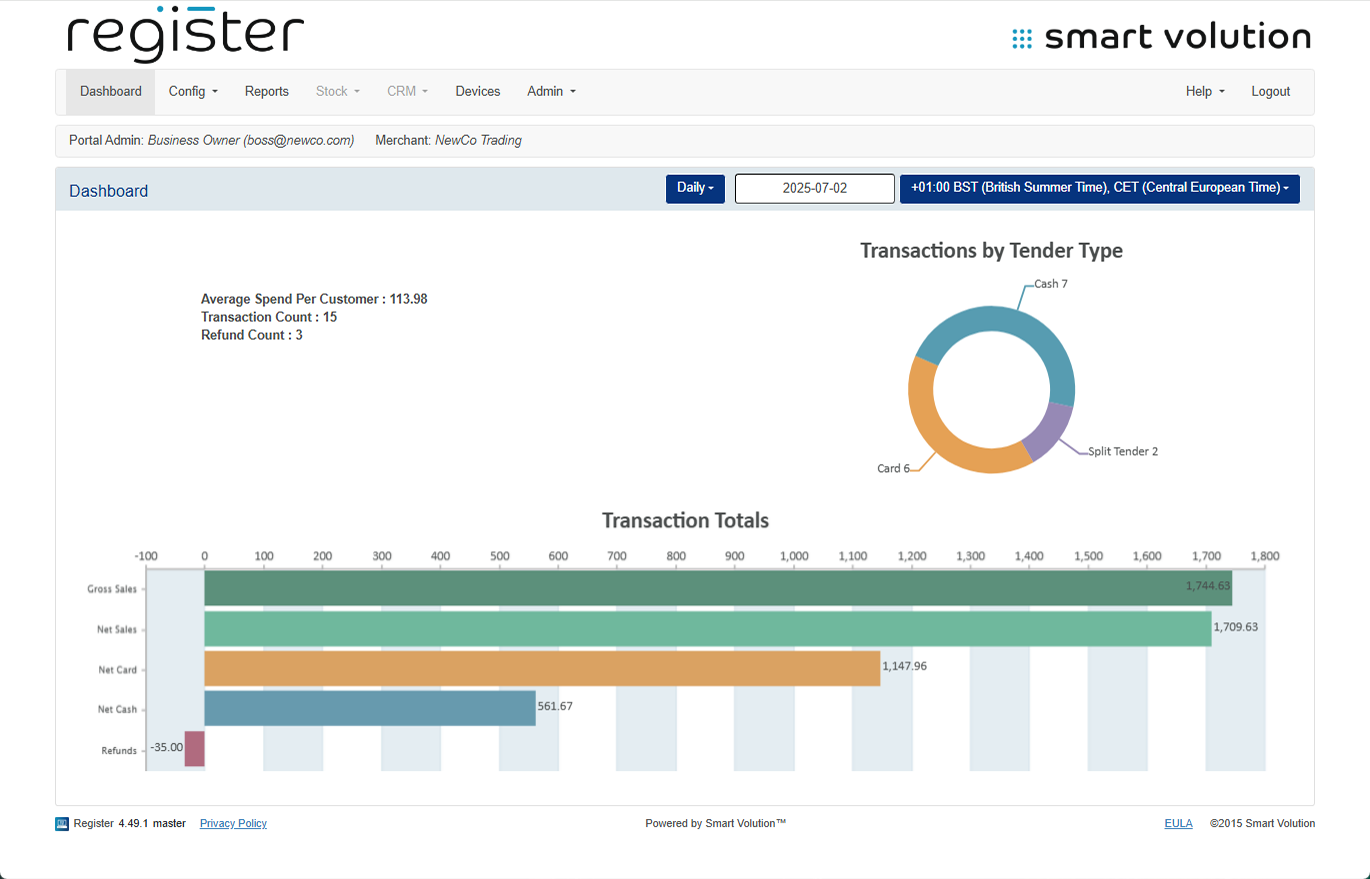
Details the sales totals for all your devices for the current day:
| Report Field | Description |
|---|---|
| Avg Spend per Customer | Net Sales divided by Transactions |
| Transaction Count | Number of transactions |
| Refund Count | Number of refunds |
| Transaction by Tender | Chart showing split by payment method |
| Gross Sales | Total sales before deductions |
| Net Sales | Gross Sales minus refunds |
| Net Card | Total card sales |
| Net Cash | Total cash sales |
| Refund Total | Total amount of refunds |
Combined sales total for the whole business (for customers with multiple devices):
| Report Field | Description |
|---|---|
| Transaction Count | Total transactions |
| Refunds | Number of refunds |
| Refund Total | Total refund value |
| Gross Sales | Sales before deductions |
| Net Sales | Sales after deductions |
| Cash Transactions | Number of cash sales |
| Net Cash | Value of cash sales |
| Card Transactions | Number of card sales |
| Net Card | Value of card sales |
| Split Tender Transactions | Number of split payment sales |
| Avg Spend per Customer | Average value per customer |
| Tips | Total tips |
| Cash Tips | Tips received in cash |
| Card Tips | Tips received via card |


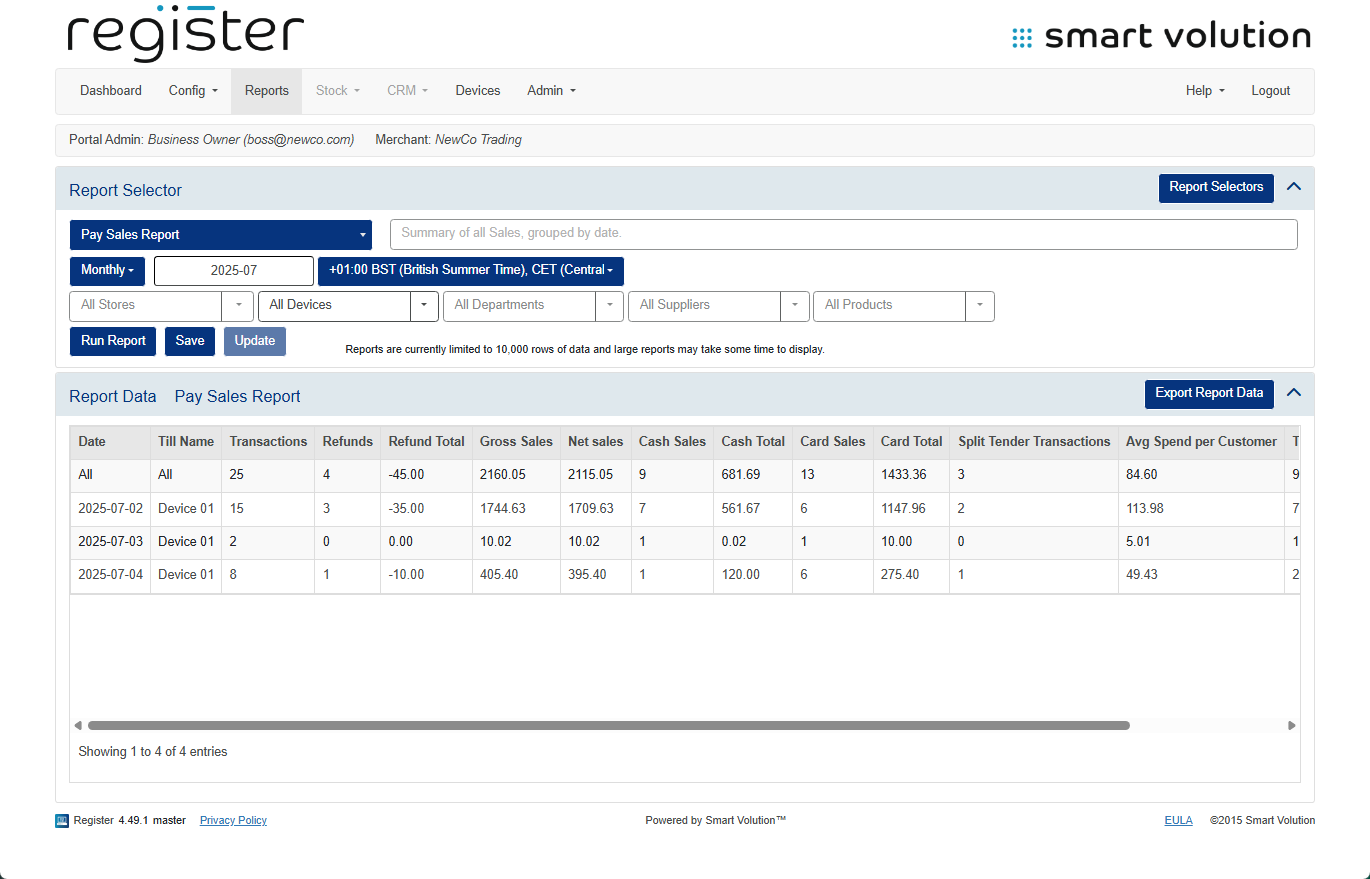
Daily sales totals for each device reported by date.
| Report Field | Description |
|---|---|
| Date | Date of the sales
|
| Till Name | Name of the device
|
| Transaction Count | Total transactions
|
| Refunds | Number of refunds
|
| Refund Total | Total refund value
|
| Gross Sales | Sales before deductions
|
| Net Sales | Sales after deductions
|
| Cash Transactions | Number of cash sales
|
| Net Cash | Value of cash sales
|
| Card Transactions | Number of card sales
|
| Net Card | Value of card sales
|
| Split Tender Transactions | Number of split payment sales
|
| Avg Spend per Customer | Average value per customer
|
| Tips | Total tips
|
| Cash Tips | Tips received in cash
|
| Card Tips | Tips received via card
|
Z Report / End Day sales totals for each device reported by date.
| Report Field | Description |
|---|---|
| Till Name | Name of the device
|
| Start Date | Date of first transaction |
| Start Time | Time of first transaction |
| End Date | Date of End Day |
| End Time | Time of End Day |
| Duration | Time between start and End Day |
| Transaction Count | Total transactions
|
| Refunds | Number of refunds
|
| Refund Total | Total refund value
|
| Gross Sales | Sales before deductions
|
| Net Sales | Sales after deductions
|
| Cash Transactions | Number of cash sales
|
| Net Cash | Value of cash sales
|
| Card Transactions | Number of card sales
|
| Net Card | Value of card sales
|
| Split Tender Transactions | Number of split payment sales
|
| Avg Spend per Customer | Average value per customer
|
| Tips | Total tips
|
| Cash Tips | Tips received in cash
|
| Card Tips | Tips received via card
|
Sales totals split by staff member.
| Report Field | Description |
|---|---|
| Staff Code | Staff member's code |
| Staff Name | Staff member's name |
| Transactions | Number of transactions by staff |
| Refunds | Number of refunds |
| Refund Total | Refund value |
| Gross Sales | Total sales before refunds |
| Net Sales | Sales after refunds |
| Cash Transactions | Number of cash sales |
| Net Cash | Value of cash sales |
| Card Transactions | Number of card sales |
| Net Card | Value of card sales |
| Split Tender Transactions | Number of split payment sales |
| Cancel Transactions | Number of cancelled sales |
| Largest Transaction | Highest sale value by this staff |
| Avg Spend per Customer | Net Sales divided by Transaction Count |
| Tips | Total tips by this staff |
| Cash Tips | Cash tips by this staff |
| Card Tips | Card tips by this staff |


Report detailing all refunds carried out.
| Report FIeld | Description |
|---|---|
| Date | Date of the refund |
| Till Name | Device used |
| Staff Code | Code of refunding staff member |
| Staff Name | Name of refunding staff member |
| Refund Amount | Refund value |
| Tender Type | Refund payment method |
| Transaction ID | ID of the refund transaction |

A detailed report showing everything that happened within a transaction, typically used for support purposes.
| Report Field | Description |
|---|---|
| App Version | Application version
|
| Transaction ID | Server-side ID
|
| Reference | Optional transaction name
|
| Device Transaction ID | Receipt-visible transaction ID
|
| Date | Transaction date
|
| Time | Time of transaction (with time zone)
|
| Device Name | Device used
|
| Staff Name | Name of staff member
|
| Transaction Type | Type (SALE, REFUND, etc.)
|
| Price | Transaction amount
|
| Amount Tendered | Amount tendered
|
| Change Given | Change returned (for CASH)
|
| Auth Code | Authorisation code for CARD
|
| Card PAN | Last 4 digits of the card
|
| Tip Amount | Tips included
|
| Item Name | Name of item
|
| Item Price | Item value
|
| Item Type | Type of item
|
| Item Added | Timestamp item added
|
| Custom Data | Any extra info from payment app
|

Report showing all transactions similar to the Transaction History screen.
| Report Field | Description |
|---|---|
| App Version | Application version
|
| Transaction ID | Server-side ID
|
| Reference | Optional transaction name
|
| Device Transaction ID | Receipt-visible transaction ID
|
| Date | Transaction date
|
| Time | Time of transaction (with time zone)
|
| Device Name | Device used
|
| Staff Name | Name of staff member
|
| Transaction Type | Type (SALE, REFUND, etc.)
|
| Price | Transaction amount
|
| Amount Tendered | Amount tendered
|
| Change Given | Change returned (for CASH)
|
| Tip Amount | Tips included |
| Auth Code | Authorisation code for CARD
|
| Card PAN | Last 4 digits of the card
|